Navigation
FraudScore offers simple and intuitive navigation within the account.
The primary navigation tool is the Sidebar, located on the left. It contains the following elements:
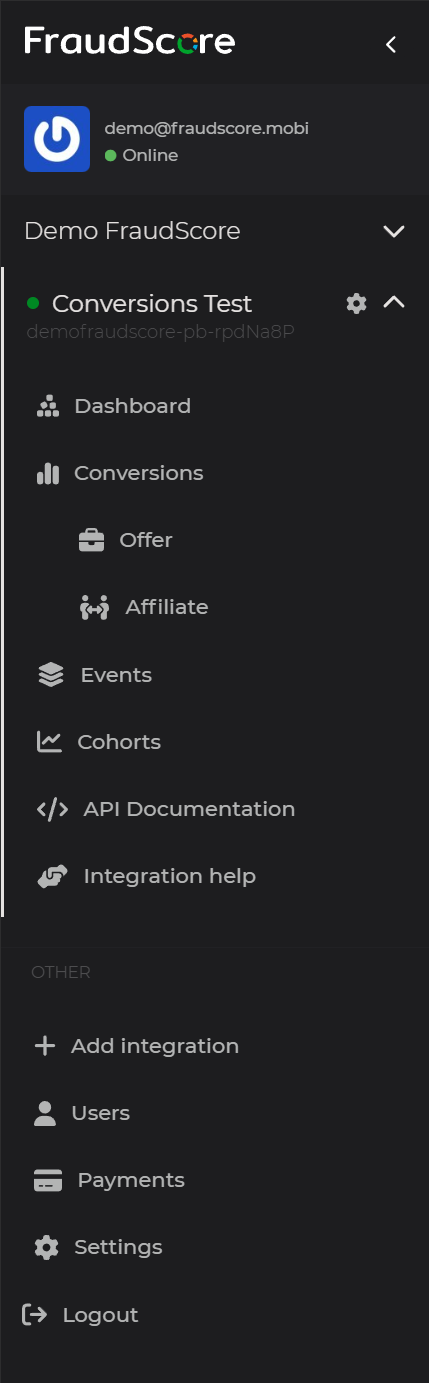
- Demo User / demo@fraudscore.mobi - name and email of the account used to log in;
-
Test company - the selected company; if the account has access to multiple companies, they will be listed in the Sidebar; names are marked with a blue circle containing the company initial; the company includes a list of integrations and company controls:
-
S2S Test - the name of the selected integration; if there are multiple integrations, they will be listed in the Sidebar; the integration status is indicated by a colored dot:
active, paused, blocked, pending;
the integration contains a list of reports and integration controls:
- Dashboard - a general overview of traffic quality assessment and detected fraud;
- Conversions - a report on analyzed conversions;
- Reattributions - a report on analyzed reattributions;
- Events - a report on analyzed events;
- Cohorts - a cohort report for analyzing user activity;
- Alerts - traffic quality alerts management;
- Integration settings - configuration settings for the integration;
- API Documentation - documentation for the Data API with access to an interactive sandbox;
-
Add integration - adding new integrations to the company;
- Users - company users management;
- Payments - company payments management;
-
-
Account settings - personal account settings;
- Logout - log out of the account.
oct 2, 2026